> ## Documentation Index
> Fetch the complete documentation index at: https://docs.conductor.is/llms.txt
> Use this file to discover all available pages before exploring further.
# Get a free QuickBooks Desktop developer license
> Obtain a free Not-For-Resale (NFR) license to use QuickBooks Desktop indefinitely for development and testing with Conductor. Takes 2 minutes.
export const Image = ({src, alt, width, align = "center", noShadow = false, noBorder = false, noZoom = false}) =>  ;
To develop and test integrations with Conductor, you need your own QuickBooks Desktop instance. If you don't have an existing instance, you can [install the QuickBooks Desktop free trial](/qbd/test-instance). The trial includes all features of the full version but expires after 30 days. To continue using QuickBooks Desktop for development beyond this period, you'll need a free Not-For-Resale (NFR) license. Follow these steps to obtain one:
If you haven't already, follow our guide for [installing the QuickBooks Desktop free trial](/qbd/test-instance).
[Sign up for an Intuit developer account](https://accounts.intuit.com/app/sign-in?start_screen_hint=SignUp) if you don't have one. This account is required to request the NFR license.
1. Go to [Intuit's developer support page](https://help.developer.intuit.com/s/contactsupport).
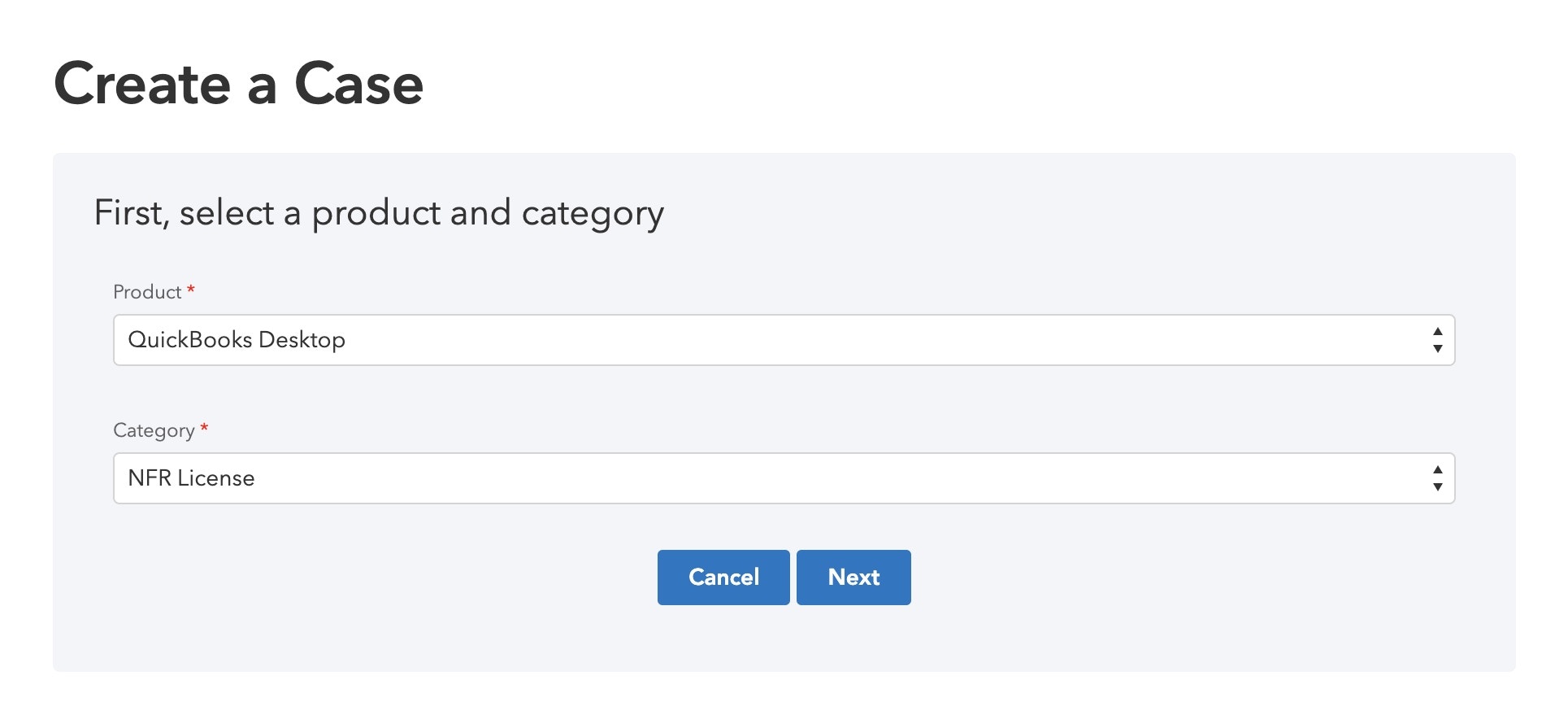
2. Choose the following options:
* **Product**: QuickBooks Desktop
* **Category**: NFR License
3. Click "Next" to proceed.
;
To develop and test integrations with Conductor, you need your own QuickBooks Desktop instance. If you don't have an existing instance, you can [install the QuickBooks Desktop free trial](/qbd/test-instance). The trial includes all features of the full version but expires after 30 days. To continue using QuickBooks Desktop for development beyond this period, you'll need a free Not-For-Resale (NFR) license. Follow these steps to obtain one:
If you haven't already, follow our guide for [installing the QuickBooks Desktop free trial](/qbd/test-instance).
[Sign up for an Intuit developer account](https://accounts.intuit.com/app/sign-in?start_screen_hint=SignUp) if you don't have one. This account is required to request the NFR license.
1. Go to [Intuit's developer support page](https://help.developer.intuit.com/s/contactsupport).
2. Choose the following options:
* **Product**: QuickBooks Desktop
* **Category**: NFR License
3. Click "Next" to proceed.
 On the next page, specify:
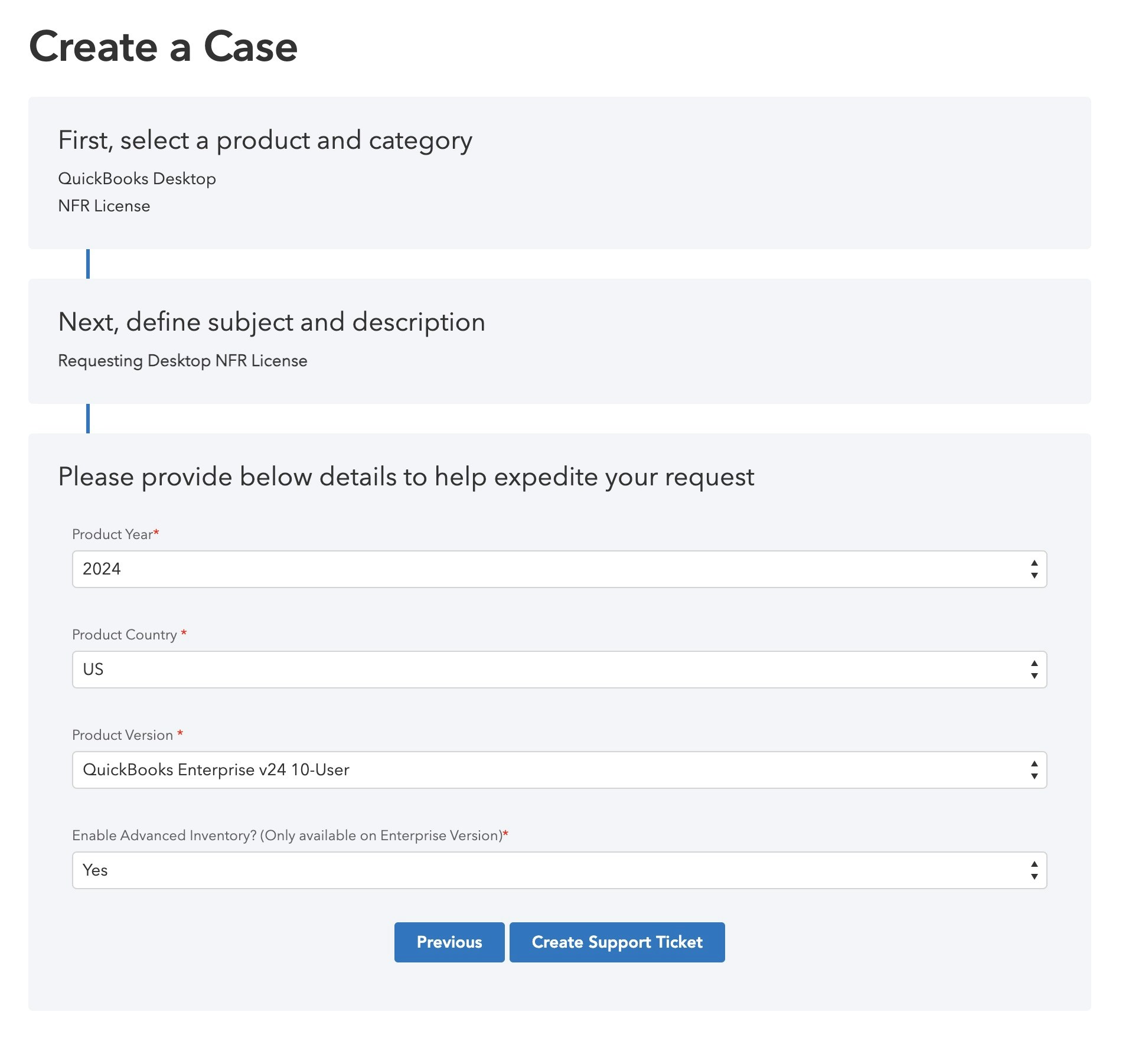
* **Product Year**: 2024 (or the latest available)
* **Product Country**: US
* **Product Version**: QuickBooks Enterprise v24 (or the latest version)
Conductor works identically with all QuickBooks Desktop versions and editions. We recommend the Enterprise edition for development to avoid potential limitations in user count and dataset size.
* **Enable Advanced Inventory?** Yes (Allows testing with the full feature set)
After filling out these details, click "Create Support Ticket".
On the next page, specify:
* **Product Year**: 2024 (or the latest available)
* **Product Country**: US
* **Product Version**: QuickBooks Enterprise v24 (or the latest version)
Conductor works identically with all QuickBooks Desktop versions and editions. We recommend the Enterprise edition for development to avoid potential limitations in user count and dataset size.
* **Enable Advanced Inventory?** Yes (Allows testing with the full feature set)
After filling out these details, click "Create Support Ticket".
 After you click "Create Support Ticket", Intuit will send you a confirmation email. Intuit will send you another email within 24-48 hours with your license key.
Once you have the license key:
1. Open your existing QuickBooks Desktop trial installation.
2. Go to **Help → Manage My License → Change My License Number**.
3. Enter the NFR license key when prompted.
4. Follow any additional on-screen instructions to complete activation.
Your QuickBooks Desktop is now licensed for indefinite use in development and testing with Conductor.
After you click "Create Support Ticket", Intuit will send you a confirmation email. Intuit will send you another email within 24-48 hours with your license key.
Once you have the license key:
1. Open your existing QuickBooks Desktop trial installation.
2. Go to **Help → Manage My License → Change My License Number**.
3. Enter the NFR license key when prompted.
4. Follow any additional on-screen instructions to complete activation.
Your QuickBooks Desktop is now licensed for indefinite use in development and testing with Conductor.